
iReal Pro
TechnimoMusic & Audio
4.7787.00 Reviews
- Version
- Varies With Device
- Installs
- 500.00K
- Age Rating
- Everyone
Screenshots
Our Review of iReal Pro
 Analysis by Appyee
In a shared home, music practice rarely happens in a vacuum. Someone is warming up at the kitchen table, another person is trying to finish a call, and a guitarist wants a steady rhythm without asking a friend to come over. I like iReal Pro for that kind of ordinary, make-time-where-you-can practice: it gives a player chord charts and accompaniment in one place, so a short session can feel more focused than simply running through a tune alone.
That setup can suit a household with different musical interests, too. One person may use a chart to work through harmony while another listens to a backing arrangement or tries a song in a more comfortable key. It is not a substitute for playing together, and it does not make a shared room quiet, but it can make solo practice less dependent on another person being available at the same moment.
Making a shared practice routine work
When a shared practice routine starts to take shape, I find it helps to agree on one small goal for each session: tighten a chord change, test a new key, or play through a tune without stopping. That keeps the device from becoming the center of attention and makes it easier for different players to take turns. The next question is how to share it without assuming everyone wants the same setup.
One device, different musical goals
The app is a music and audio tool from Technimo, built around chord charts and backing tracks rather than lessons or a general-purpose music player. That focus matters in a shared-use situation. A household member who wants guided instruction from the first note may be happier with a teaching app, while someone who already knows how to follow chord changes can use this as a practical rehearsal companion.
For example, I can picture a guitarist opening a chart before dinner, changing its key to match their range, and using playback to rehearse the form. Later, another player could use the same device for a different tune. The useful distinction is that the app supports those separate practice goals; it does not imply separate household profiles or automatically keep one person’s work apart from another’s.
Set expectations before passing the device around
If several people use one phone or tablet, I would agree on a simple routine rather than assume the app will manage household boundaries. Decide who is responsible for editing or sharing charts, and avoid treating a shared device as a private account. That is especially sensible when one person is experimenting with arrangements that another player relies on for rehearsal.
There is also a practical difference between browsing a chart and changing it. A beginner may only want to read along, while a more experienced musician may edit a progression or transpose it. Before a group practice, I would make sure the version everyone intends to use is clear, so a last-minute edit does not confuse the next player. This is a small habit, but it prevents a shared tool from becoming a source of avoidable friction.
Coordinating practice without turning it into a project
For a casual jam, the strongest workflow is to agree on a tune and key first, then use the chart and accompaniment as a common reference. If one player wants to sing, transposing can help bring the song into a more comfortable range; if the group is working on timing, a steady backing arrangement can provide a repeatable pulse. Neither replaces listening to one another, but both can reduce the time spent negotiating what happens next.
When people share charts, I would treat community material as a starting point rather than assume every version matches the arrangement a group has in mind. Check the chord sequence and form before rehearsal, especially if players have learned the tune differently. That quick review can save a group from discovering halfway through that everyone expected a different route through the song.
Age, trust, and realistic expectations
The content rating is Everyone, which makes the app broadly suitable by age classification, but that does not mean every younger player will find it self-explanatory. Chord symbols, key changes, and accompaniment styles make more sense with some musical context. I would be comfortable letting a child explore it alongside an adult or music teacher, while still setting expectations about how shared charts and any account activity are handled on the device.
Its audience figures suggest that it has found a substantial music-making community: it has a 4.7 average from around 19 thousand ratings, with over 500 thousand installs. Those figures are reassuring as signs of ongoing interest, but they do not tell me whether the app fits a particular player’s instrument, reading ability, or preferred way of learning. I would judge it by whether chord charts and arranged playback match the practice the household actually wants to do.
Who will get the most from it
I would recommend it most readily to players who can already follow chord symbols and want a flexible accompaniment for rehearsal, improvisation, or trying a song in another key. It can also be useful for a teacher or a small group that needs a consistent reference between meetings. The combination of a chart and playback is more convenient than juggling a chord sheet in one place and a separate backing-track source in another.
On the other hand, a complete beginner who needs finger-by-finger instruction, a structured course, or feedback on technique should look elsewhere or pair this with a teaching resource. A musician who wants realistic live interaction may also prefer rehearsing with people; a programmed accompaniment cannot respond to a dynamic change, a spontaneous pause, or the way a band shapes a phrase. The app is strongest when the player brings musical intent to it.
Cost and the commitment behind the purchase
At $21.99, this is a paid app rather than a casual free download, so I would think about how often it will be used and whether chord-chart practice is already part of the routine. In-app purchases are listed at $6.99 per item, another reason to check what is included and what a particular household member actually needs before making extra purchases. I would not buy it just because someone in the family has recently picked up an instrument; I would buy it when they have a clear use for charts and backing tracks.
It was released on Aug 3, 2011, and its long presence in music practice gives it a different feel from a brand-new, trend-driven audio app. That history alone is not a guarantee that its approach suits everyone, but it does make the purpose easy to understand: this is a focused tool for working with songs, not a social network, a streaming service, or a step-by-step course.
Getting more from a practice session
A useful way to work is to start with the chart at a comfortable tempo, play through the full form once, and only then isolate a section that causes trouble. Looping a passage can help with repeated changes, but I would return to the whole tune regularly so the player does not learn one transition while losing the larger structure. That balance makes the practice more musical than endlessly drilling a few bars.
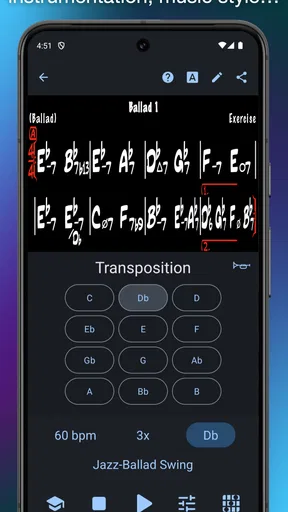
Transposition is especially helpful when the goal is to practice the same harmony in more than one key. Rather than immediately changing every tune to the easiest option, I would use a familiar song to explore a new key gradually, then check whether the player can still follow the progression by ear and by chart. It turns a convenience into a deliberate exercise, though it is not a replacement for learning how the harmony works.
Playback styles and tempo adjustments can also change what a session is for. A slower setting is useful when the chord changes are not secure; a more comfortable performance pace is better for testing whether the player can stay with the form. I would avoid treating the backing track as a perfect model of how a human ensemble should feel. Its value is consistency, while expressive timing and group interaction still need real musicians.
How it compares with familiar alternatives
Compared with a basic metronome, this offers more musical context: the player can work against accompaniment and follow a progression instead of hearing only a click. Compared with a folder of printed charts, it is easier to transpose and pair a tune with playback. A music-streaming app may be better for listening to finished recordings, and a lesson app may be better for learning an instrument from scratch, but neither is automatically as useful for rehearsing changes against a customizable backing.
The trade-off is that a chart-centered workflow assumes the user wants to engage with the music actively. If someone only wants a playlist, this will feel like unnecessary work. If they need a polished recording of a specific arrangement, a backing track may not match that exact version. I see it as a practice aid between those extremes: more interactive than passive listening, but less responsive than a live accompanist.
What to check before a household jam
Before inviting everyone to play, I would settle on the chart, confirm the key, and decide who controls playback. If the device will be passed around, keep edits intentional and let the next player know what changed. These steps matter more than elaborate planning because the app is most helpful when it removes small obstacles rather than becoming another thing the group has to manage.
It is also worth thinking about the room and the device’s role. One person may be reading the screen while another plays, so a stand or a position everyone can see may be more useful than constantly handing the phone back and forth. I would keep the session short at first, choose a tune everyone recognizes, and see whether the chart-plus-accompaniment format helps the group stay together. That is a better test of fit than judging it only by how many options appear in the interface.
Where the app can frustrate
The clean presentation is helpful, but the musical shorthand can still be a barrier. A player unfamiliar with chord symbols may not know what to do with a chart, and the app cannot automatically turn that notation into instrumental technique or explain why a progression works. There is a learning curve in deciding how to use charts, tempo, and accompaniment together, even if the basic idea is straightforward.
There is a second limitation in the nature of backing tracks: they keep a consistent pulse, but they do not listen and adapt. If a player speeds up, delays a change, or wants to stretch a phrase, the accompaniment will not negotiate in the way a patient bandmate might. For some practice, that firmness is exactly what is useful; for expressive rehearsal, it can feel rigid. I would use it to build reliability, then take the tune to other musicians.
A household verdict for working musicians
For a home with one or more people who already enjoy playing from chord charts, this can be a worthwhile shared practice tool. Its age rating is Everyone, but the best fit depends less on age than on musical readiness and whether the household is comfortable using a common device without expecting separate boundaries the app may not provide. A parent, teacher, or experienced player can help a newer musician get more from it by choosing an approachable tune and explaining the chart.
I would skip it for a household that mainly wants music lessons, a karaoke library, or an accompaniment that follows spontaneous changes. I would also hesitate if nobody is likely to open a chord chart after the first week. But when someone regularly practices songs, works on transposition, or wants a dependable backing arrangement without coordinating another player’s schedule, it fills a specific gap that ordinary audio apps do not.
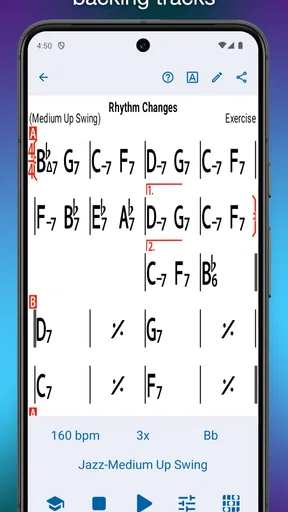
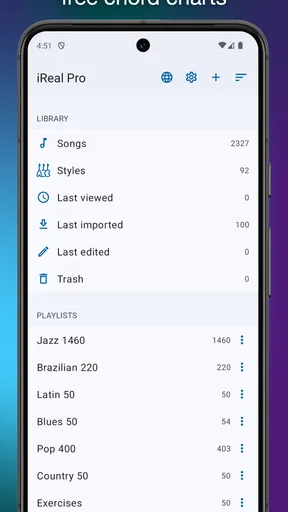
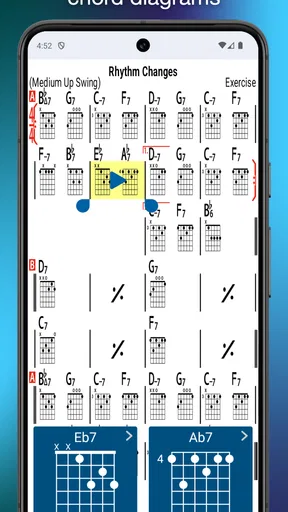
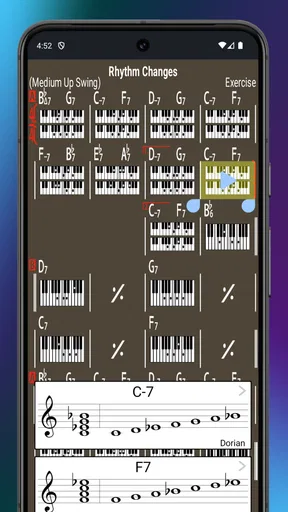
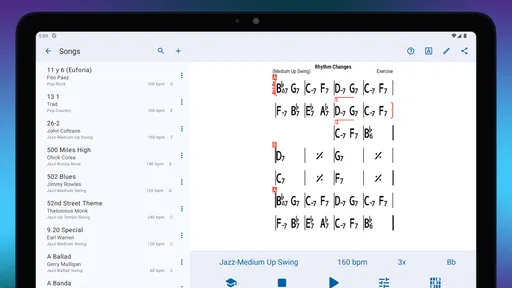
So, you’ve downloaded iReal Pro, fired it up, and now you’re staring at a sleek and simple interface. The app is designed to look clean, making it easy for you to navigate from the get-go. You can start by exploring its massive library of chord charts. Seriously, it’s like a treasure trove of music waiting to be explored!
The beauty of this app is how it caters to both beginners and advanced players. If you’re new to the music scene, you’ll appreciate the simplicity and guidance it offers. Meanwhile, seasoned musicians can dive straight into customizing their own tunes.
Features That Hit the Right Note
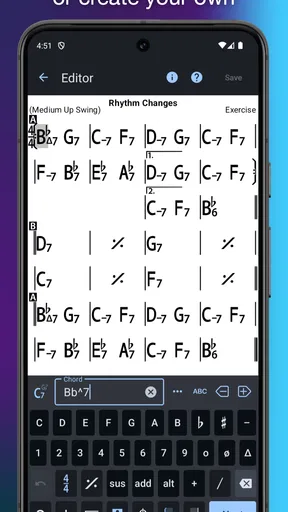
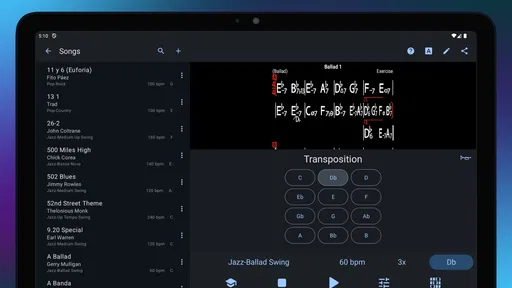
One of the standout features is the ability to create and edit chord charts. You can literally take any song and tweak it to your heart’s content. Imagine playing that classic jazz standard with your own unique twist. You can even transpose songs to any key, which is a lifesaver if you're practicing for a performance.
Another nifty feature is the playback option. You can choose from different styles and adjust the tempo. It’s like having a virtual band ready to jam whenever you are. Whether you’re into jazz, rock, or pop, there’s a style to suit your mood.
The Practice Companion You’ve Been Waiting For
Practicing can sometimes feel like a chore, but not with iReal Pro. The app’s practice features make it fun and engaging. You can loop sections of a song to nail those tricky parts, and even use the built-in metronome to keep your timing spot on.
For those who love to experiment, the app offers backing tracks that you can modify to suit your practice needs. Want to slow down a fast section or speed up a slow one? No problem. The app gives you the flexibility to practice at your own pace.
Community and Sharing
One of the coolest aspects of iReal Pro is the community behind it. You can download charts from other users, giving you endless options to explore. Plus, sharing your own creations with others is a breeze, making it a truly collaborative experience.
For musicians who love to connect, this feature is a goldmine. You can get feedback, discover new tunes, and even collaborate with fellow musicians across the globe. It’s like being part of a worldwide jam session.
Wrapping It Up
In a nutshell, iReal Pro is more than just an app; it’s a game-changer for musicians. Whether you’re practicing on your own or jamming with friends, it’s a tool that adapts to your needs. The ability to customize, share, and practice in a way that's tailored to you sets this app apart.
If you’re a musician looking to take your playing to the next level, give it a spin. It might just become your favorite companion on your musical journey. Happy jamming!
Verdict
Strengths of iReal Pro
- Authentic sound quality enhances practice.
- Wide range of chord charts available.
- Customizable backing tracks for genres.
- Easy to transpose songs to any key.
- Regular updates with new features.
Limitations of iReal Pro
- Limited free content without purchase.
- No vocals, only instrumental support.
- User interface can be overwhelming.
- Requires practice for full feature use.
- Some features need internet access.
Similar Picks in This Category
View All
YouTube Music
Google LLC4.4

Samsung Music
Samsung Electronics Co., Ltd.3.8

Spotify: Music and Podcasts
Spotify AB4.3

JioSaavn - Music & Podcasts
Saavn Media Limited4.3

Lark Player:Music Player & MP3
Lark Player Studio - Music, MP3 & Video Player4.6

StarMaker: Sing Karaoke Songs
SKYWORK AI PTE. LTD.4.3
Frequently Asked Questions
What is iReal Pro and who is it for?
iReal Pro is a versatile music practice app designed for musicians of all levels. It's particularly useful for jazz players, allowing them to practice with virtual bands. The app provides chord charts and backing tracks for thousands of songs, making it ideal for those looking to enhance their improvisation and play-along skills.
How does iReal Pro help with music practice?
iReal Pro offers realistic-sounding backing tracks and customizable chord charts for practice. Users can adjust tempo, key, and style, enabling focused practice sessions. It supports transposition and includes built-in tools like a chord progression editor and a practice journal, making it invaluable for structured and efficient learning.
Can iReal Pro be used offline?
Yes, iReal Pro can be used offline. Once you have downloaded the app and any specific songs or backing tracks you need, you can access them without an internet connection. This feature is particularly useful for practicing on the go or in locations with limited connectivity.
Does iReal Pro have any in-app purchases or subscriptions?
iReal Pro is a one-time purchase app without subscription fees. However, users might encounter optional in-app purchases for additional features or content packs. These extras can enhance the app's functionality, but the core features are fully accessible with the initial purchase.
Is there a community or support for iReal Pro users?
Yes, iReal Pro has a vibrant user community and support system. Users can access forums to share tips, download additional songs, and seek advice. The app also offers customer support for troubleshooting, ensuring users get the most out of their experience.
